The most important barcode formats at a glance

Add and read barcodes in PDFs with webPDF
What are the benefits of working with barcodes? If you add barcodes to PDF documents, one major advantage is that documents can be identified and assigned clearly at any time.
Why barcodes are worth it
Working with barcodes improves workflow and accelerates process steps. Barcodes make documents easier to control inside the organization.
The benefit with webPDF: Using the Barcode webservice, you can apply barcodes to PDF documents and process incoming barcode documents as part of your workflow. If you receive PDF files by email or scanner, you can search them for barcodes and extract the encoded data.
Which barcode formats exist and where are they used?
A distinction is made between one-dimensional and two-dimensional barcodes. One-dimensional variants are the classic line barcodes. Two-dimensional variants use width and height and can store more information.
| Barcode type | Typical use case | Example |
|---|---|---|
| Aztec | Labeling pharmaceutical products, public transport tickets | |
| Codabar | Libraries, photo labs, blood banks, and more | |
| Code128 | Common in packaging and shipping | |
| Code39 | Electronics, chemical industry, warehousing, transport | |
| DataMatrix | Laser marking in production, automotive, chemistry/medical, tickets, mailings | |
| EAN13 | Widely used product labeling in retail | |
| EAN8 | Product labeling for smaller items where EAN13 is too long | |
| UPC A | Retail product labeling, internationally widespread | |
| ITF | Retail; ITF-14 mainly for shipping units and pallets | |
| PDF417 | Used for example on boarding passes or official forms |  |
| QR code | Very common in mobile use cases, e.g. web links | QR code |
More details about popular barcode formats are available here.
Example use case for barcodes with webPDF
A practical barcode workflow example is the city fine office in Leverkusen. In that project, webPDF was used in an SAP-based process for digital files. Letters and responses are tagged with barcodes so documents can be assigned automatically.
Important: With the webPDF portal, you can both apply and read barcodes in PDFs.
How to read barcodes in the webPDF portal
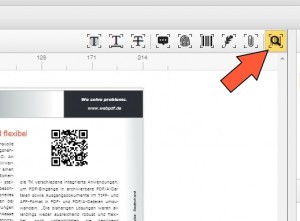
In the webPDF portal, select the Detect barcodes service:
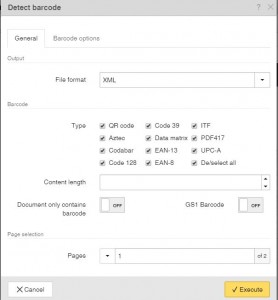
You will then see the following dialog:
How to create barcodes in the webPDF portal
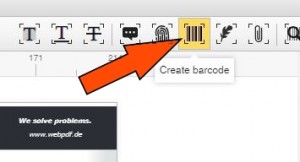
Click Create barcode:
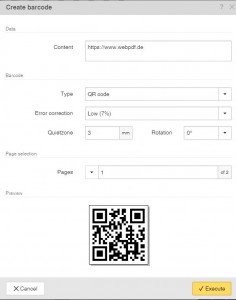
Then you get the following selection menu:
Further information
In this blog article, Working with barcodes in PDF documents, barcode creation is described in detail (including video).
Information for developers
An example structure for parameterizing barcode webservice calls is available in our webPDF documentation and on GitHub.


